Solutions - Document Intelligence

Document intelligence for KYB documents

Automatically classify uploads, extract key fields with confidence scores, and flag mismatches so reviewers only handle exceptions.
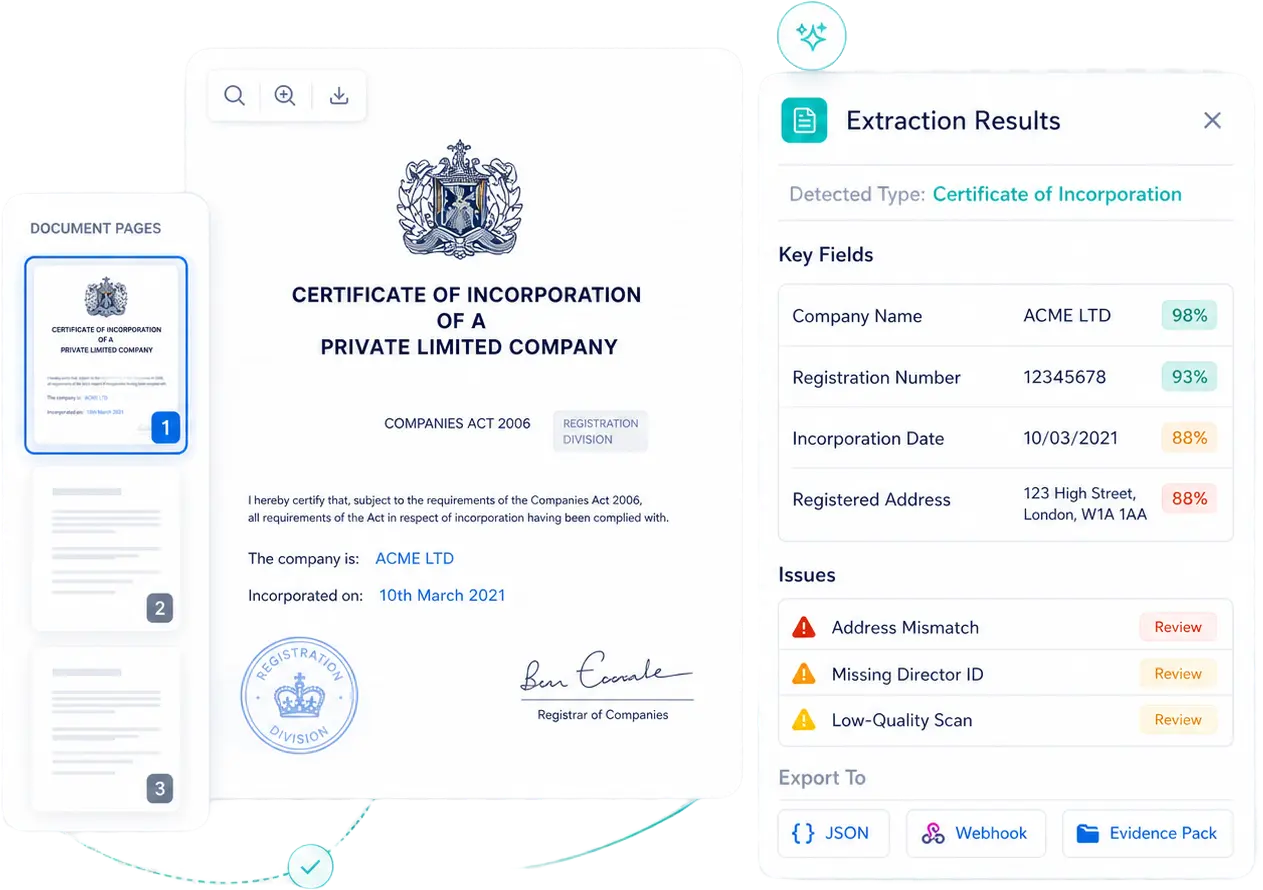
OCR • Document classification • Structured extraction for KYB evidence
Certificate of incorporation for ACME LTD with details and extraction results showing key fields and issues for review.
How do we do it

How does Document Intelligence work?

We classify KYB documents, extract structured fields with confidence scores, then validate and route exceptions to review

Corporate building icon representing business entities.

Classify & split

Detect the document type, split multi-document PDFs, and normalize pages for extraction.

Newspaper icon representing adverse media or news reports.

Extract key fields

Pull company name, registration number, dates, and addresses with per-field confidence scores.

Document icon with a checkmark representing a verified file.

Validate & route

Flag mismatches, missing items, and low-quality scans. Auto-accept high confidence, send exceptions to review, export an evidence pack.

SUPPORTED DOCUMENTS

What KYB documents can you extract data from?

Common business and ownership documents, with example fields and validation checks. Requirements vary by risk and jurisdiction.

Document type

Example fields extracted

Validation checks

Common exceptions

Certificate of incorporation / registration
Company name, reg no, legal form, incorporation date
Format validation, mismatch vs submitted profile
Missing pages, unreadable scan
Company registry extract
Registered address, status, directors, activity codes
Status active, address match, director match
Outdated extract, incomplete registry fields
Articles / bylaws / memorandum
Legal form, signatories, governance clauses
Completeness, consistency with entity type
Partial upload, mixed-language pages
Shareholder register / ownership chart / certificate of incumbency
Shareholders, ownership %, directors/roles
UBO completeness, internal consistency
Multi-hop ownership needs extra docs
Director / UBO ID (passport / national ID / residence permit)
Name, DOB, doc number, expiry (if present)
Name match, expiry check
Glare/blur, cropped corners
Director / UBO proof of address
Name, address, issue date
Recency window, address match
Different script/format, PO box edge cases
Proof of registered business address (utility / bank / letter)
Company name, address, issue date
Recency window, address match
Old document, address formatting mismatch

* Don’t see a document type? Add custom fields and validation rules per jurisdiction.

How confident the scoring is

Confidence scoring and review, built for audits

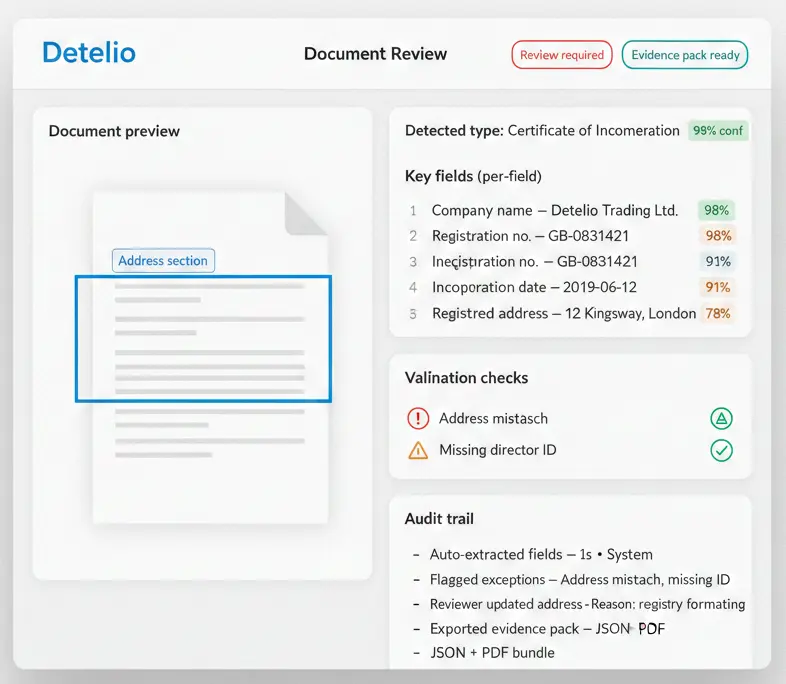
Every extracted field includes a confidence score and a source reference. Set thresholds, flag mismatches, and route exceptions to review with a full audit trail.
Network diagram icon representing corporate structures or ultimate beneficial ownership (UBO).
Per-field confidence
Scores per field, not just per document.
Multiple users icon representing team collaboration or shared entity access.
Source traceability
See the exact page and snippet behind each value.
Thumbs-up icon representing an approved status or passed compliance check.
Validation checks
Detect mismatches, missing docs, and recency issues.
Bar chart icon representing compliance analytics, metrics, or performance reports.
Audit trail
Track who reviewed, what changed, and when.
Screenshot of the Detelio Document Review dashboard. The interface displays a document preview on the left highlighting an extracted address, alongside a right-hand panel showing extracted key fields with confidence scores, validation alerts, and an automated audit trail.
What Outputs to rely on

Outputs your team can trust and automate

Use structured JSON, real-time webhooks, and an evidence pack for audits. Connect Detelio to your KYB workflow in minutes.
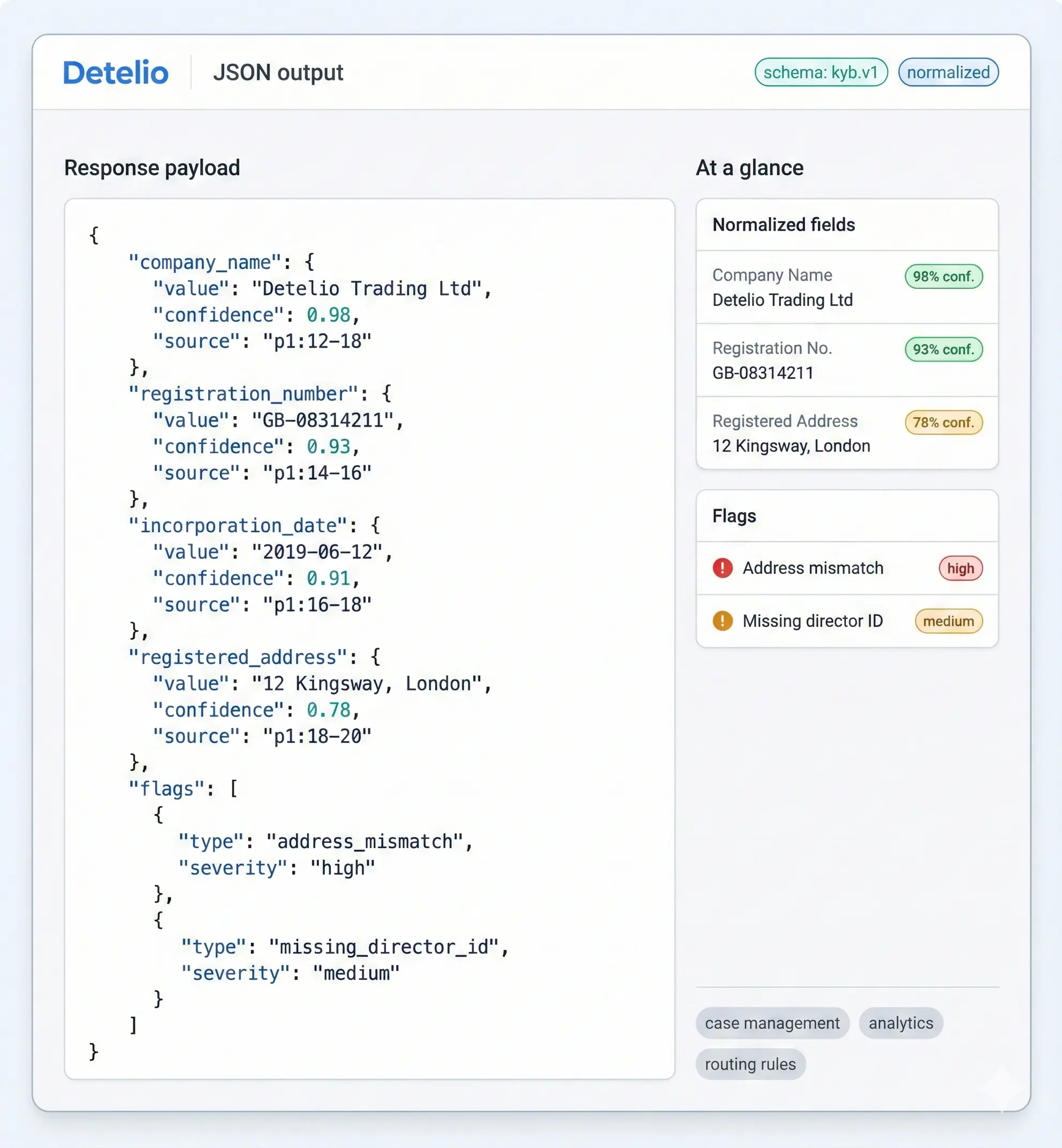
JSON output from Detelio showing company info, registration, address, and flags for address mismatch and missing ID.

Structured JSON for KYB workflows

Get normalized fields, per-field confidence, and validation results in a consistent schema.

Status indicator showing a verified checkmark icon inside a badge.
Company + ownership fields (normalized)
Status indicator showing a verified checkmark icon inside a badge.
Per-field confidence + source reference
Status indicator showing a verified checkmark icon inside a badge.
Validation flags and exception reasons
Status indicator showing a verified checkmark icon inside a badge.
Ready for case systems and BI
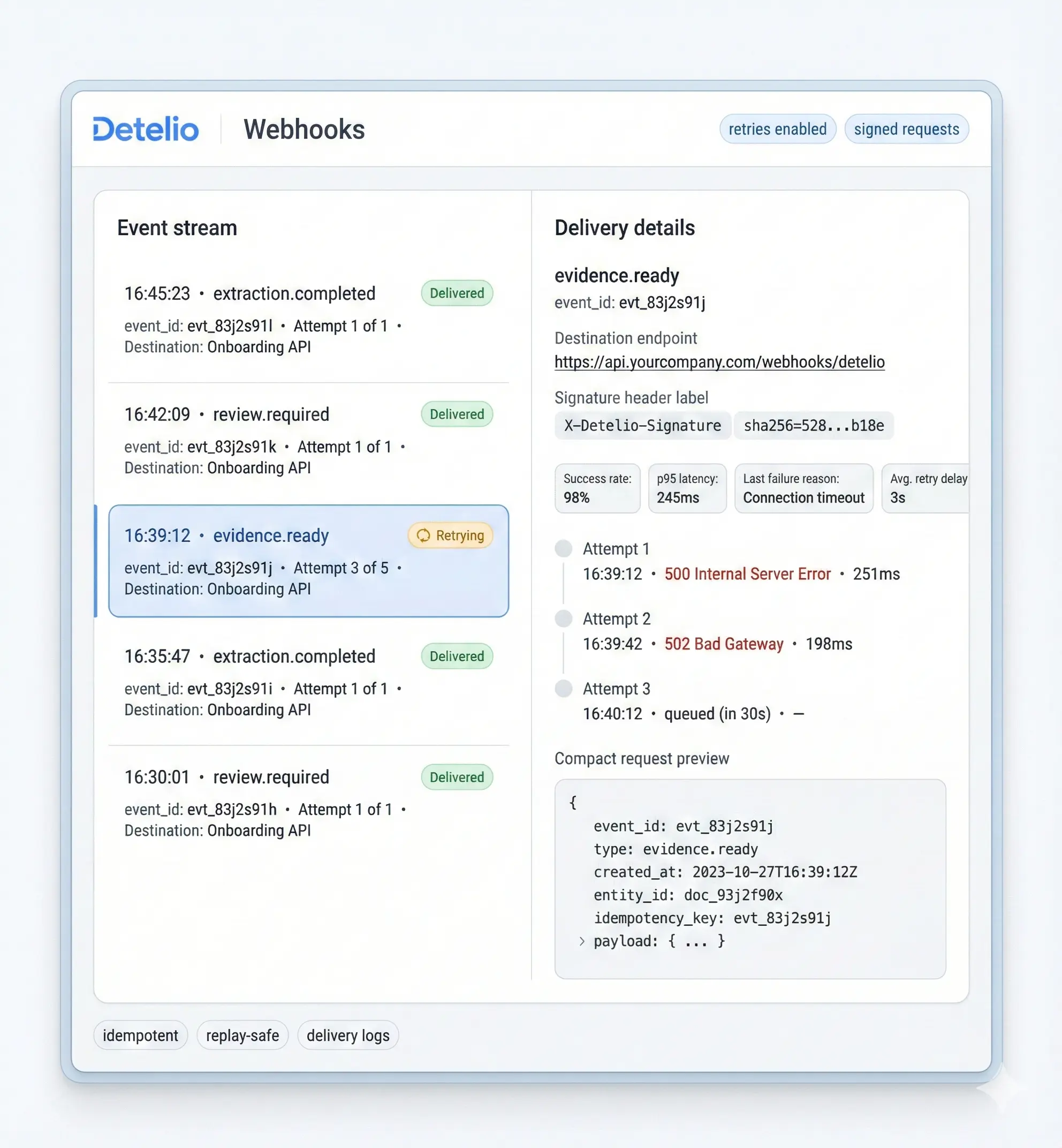
Detelio webhook interface showing event stream with delivery status and detailed retry attempts for evidence-ready event.

Real-time events, no polling

Trigger onboarding steps when extraction finishes or when review is required.
Status indicator showing a verified checkmark icon inside a badge.
extraction.completed
Status indicator showing a verified checkmark icon inside a badge.
review.required
Status indicator showing a verified checkmark icon inside a badge.
evidence.ready
Status indicator showing a verified checkmark icon inside a badge.
retry-safe delivery + timestamps
Detelio webhook interface showing event stream with delivery status and detailed retry attempts for evidence-ready event.
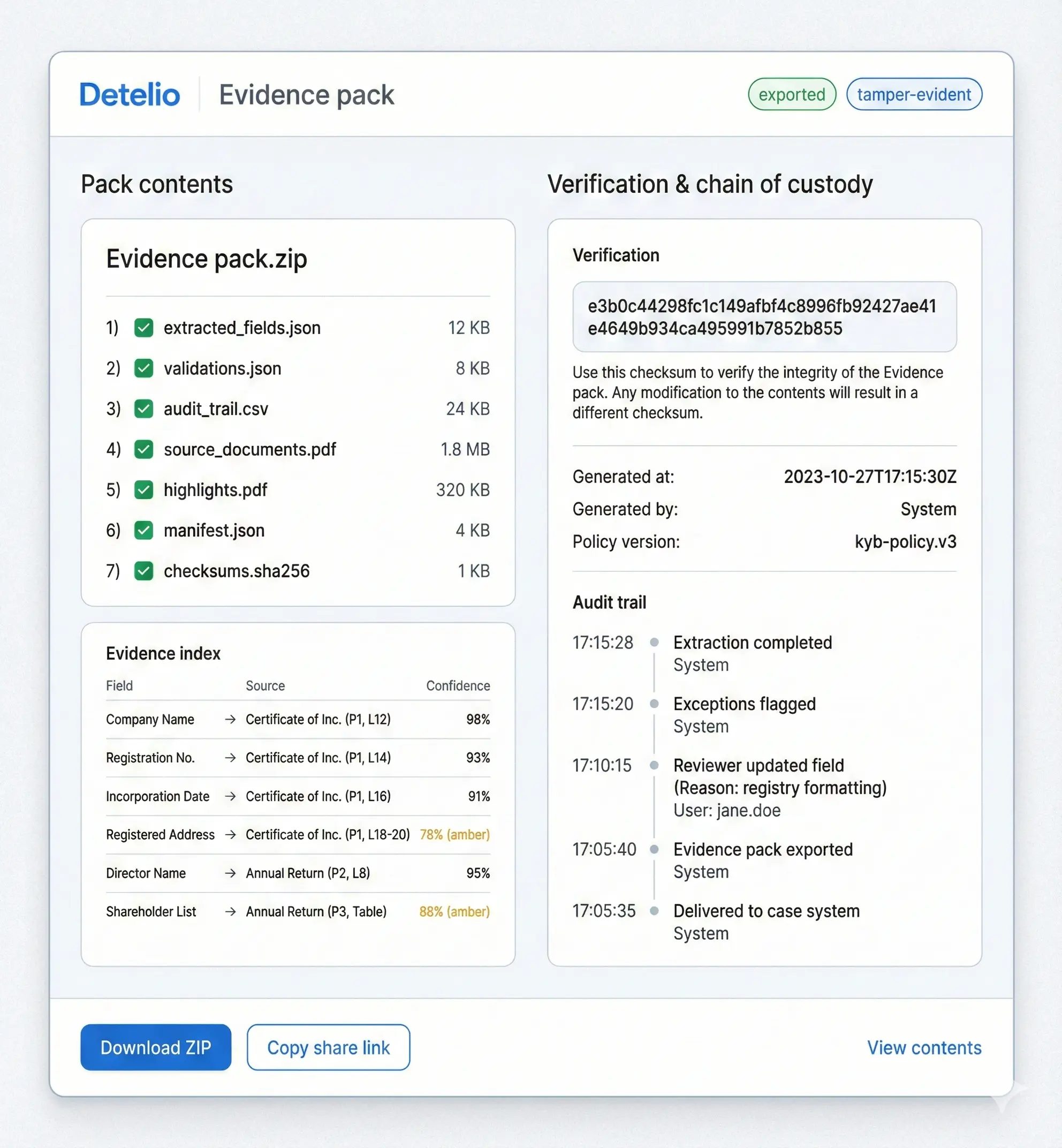
Detelio evidence pack interface showing pack contents, evidence index, verification checksum, and audit trail.

Evidence pack for audits

Export the exact sources behind each decision, plus a full review log.

Status indicator showing a verified checkmark icon inside a badge.
PDF + source highlights
Status indicator showing a verified checkmark icon inside a badge.
Field values + confidence
Status indicator showing a verified checkmark icon inside a badge.
Reviewer changes + reasons
Status indicator showing a verified checkmark icon inside a badge.
Timestamped audit trail
Questions buyers actually ask

The document intelligence FAQ

Real questions from compliance teams evaluating Detelio. If something's missing, ask us in the demo — we'd rather over-share.

What file types do you support?

Expand section details

PDFs and image uploads (scans or photos). Multi-document PDFs can be split into individual documents during intake.

What happens with blurry scans or low-quality photos?

Expand section details

Low-quality pages are flagged. If key fields fall below your confidence threshold, the case routes to review with the source highlighted.

Can we add custom fields for different jurisdictions?

Expand section details

Yes. Define the fields you need per document type and segment, then validate formats and required presence by jurisdiction.

How do confidence scores work?

Expand section details

Confidence is tracked per field (not just per document). You can auto-accept high confidence and send low confidence fields to review.

Can reviewers override extracted values?

Expand section details

Yes. Reviewers can edit values with a required reason. The original value, the change, and the reviewer action are recorded in the audit trail.

What’s included in an evidence pack?

Expand section details

Source documents, extracted fields with confidence, validation flags, and a timestamped review log for audits and internal controls.

Send 3 KYB documents. Get structured output back.

Request a demo