Solutions - Risk Scoring

KYB risk scoring you can trust and explain

Automate risk scoring for marketplace sellers, partners, and enterprise customers with configurable factors, clear rationale, and audit-ready decision trails.

Policy-driven scoring • Factor breakdowns • Full audit trail
Risk score 72 out of 100 indicating medium risk with factors: geography, UBO complexity, watchlist proximity.
The problem

Traditional risk scoring creates blind spots

When scoring is manual or opaque, teams slow down approvals and still miss the riskiest cases

Crossed-out eye icon representing hidden or obscured content.

Black-box decisions

Regulators and auditors want clear rationale and evidence.

Explore blog center
Right-facing arrow button to proceed to the next step.
Horizontal sliders icon representing configuration settings.

Inconsistent outcomes

Same profile, different reviewer, different result.

Explore blog center
Right-facing arrow button to proceed to the next step.
Clock icon representing time-based events or history.

Slow reviews at scale

Teams spend time on low-risk cases.

Explore blog center
Right-facing arrow button to proceed to the next step.
The Workflow

How Detelio risk scoring works

01

Collect verified KYB data

Pull business registry details, UBO ownership, geography, and watchlist signals into one case.

02

Apply policy-based scoring

Use configurable factors and weights aligned with your internal risk appetite.

03

Generate an explainable score

See the exact drivers behind the score, with factor-level breakdowns and rationale.

04

Trigger the right workflow

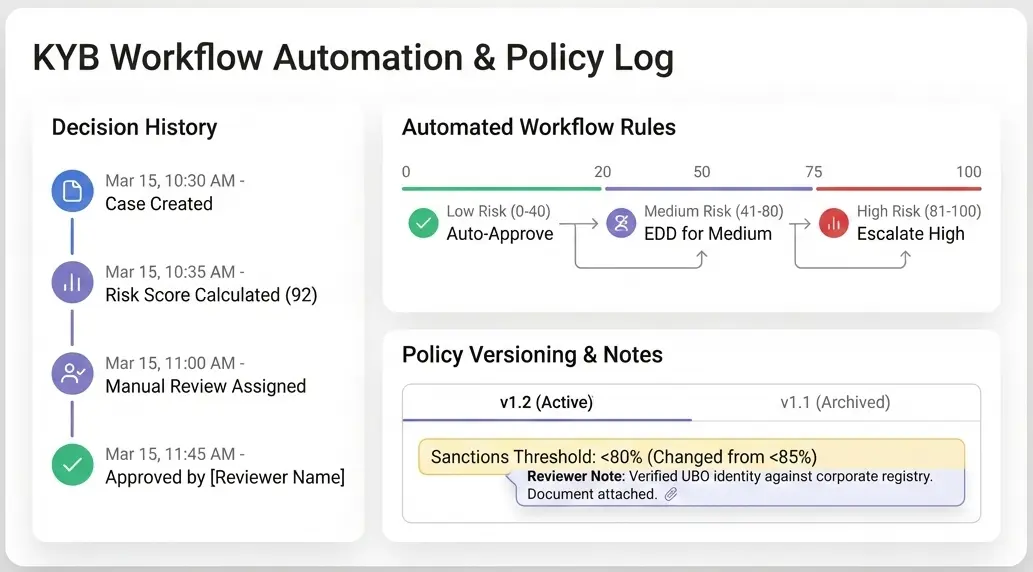
Auto-approve low risk, route medium to EDD, and escalate high risk for review.

Building the score

What goes into the score

Configurable factors and weights aligned to your policy, risk appetite, and KYB requirements.

Plus industry, adverse media, and historical decisions.
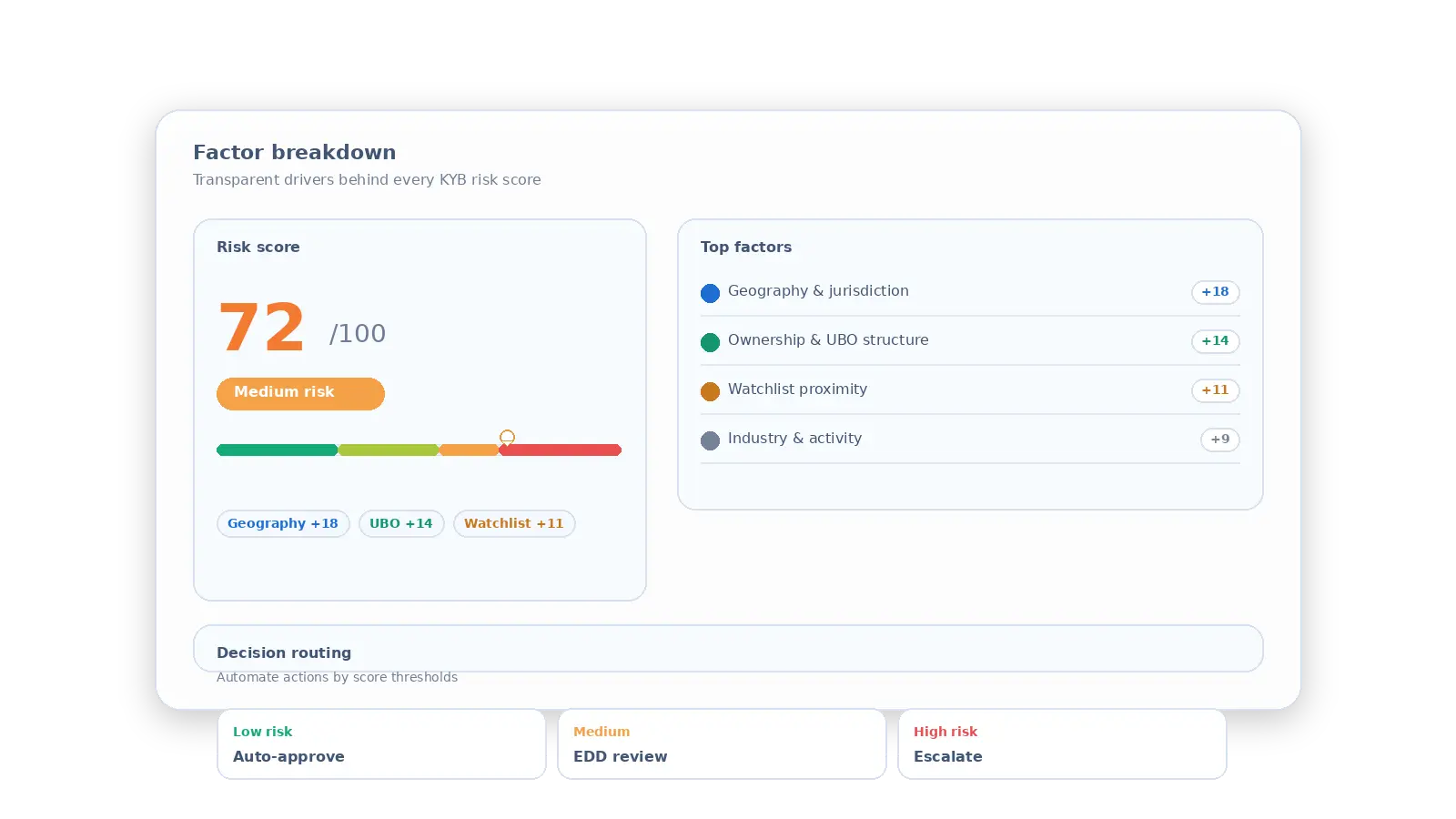
Risk score 72 medium risk with top factors geography, ownership, watchlist proximity, and industry activity.

Policy driven scoring

Adjust weights, thresholds, and routing rules for different segments and markets.
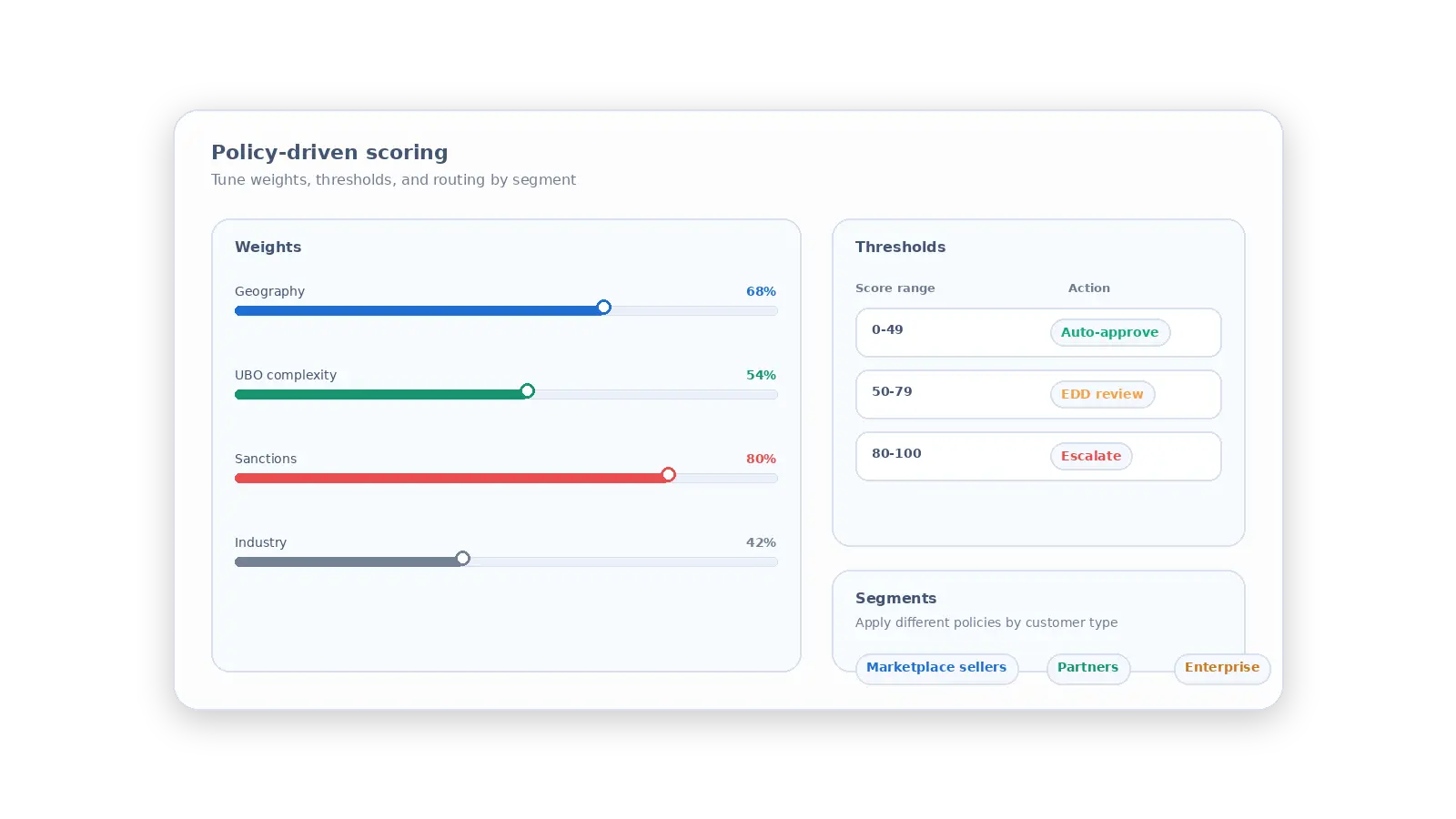
Dashboard showing policy-driven scoring with weights, thresholds, and customer segment options.

Ownership & UBO structure

Complex chains and missing UBO signals increase risk.
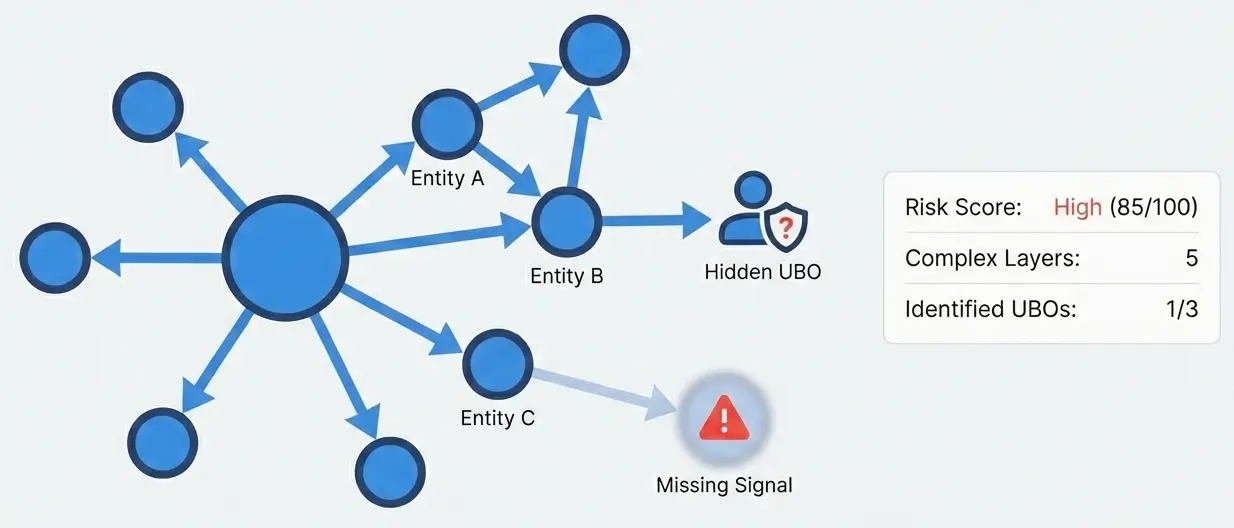
Diagram showing entities A, B, C linked to hidden UBO and missing signal with a high risk score of 85.

Sanctions & watchlists

Entity screening and related-party signals, routed by policy.
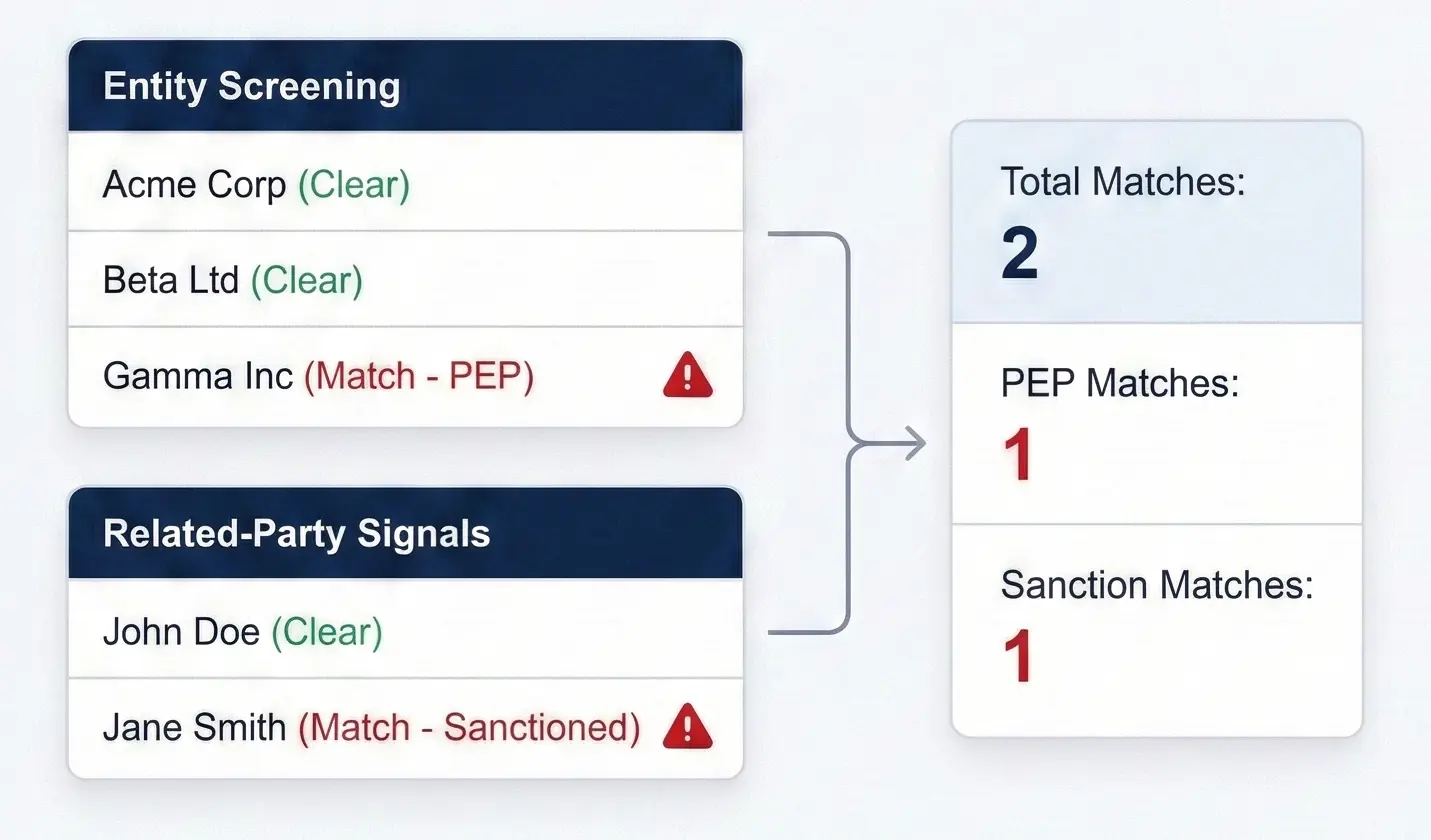
Entity screening shows 2 total matches including 1 PEP match and 1 sanction match with alerts.

Geography & jurisdiction

Country risk, operating regions, and cross-border exposure.
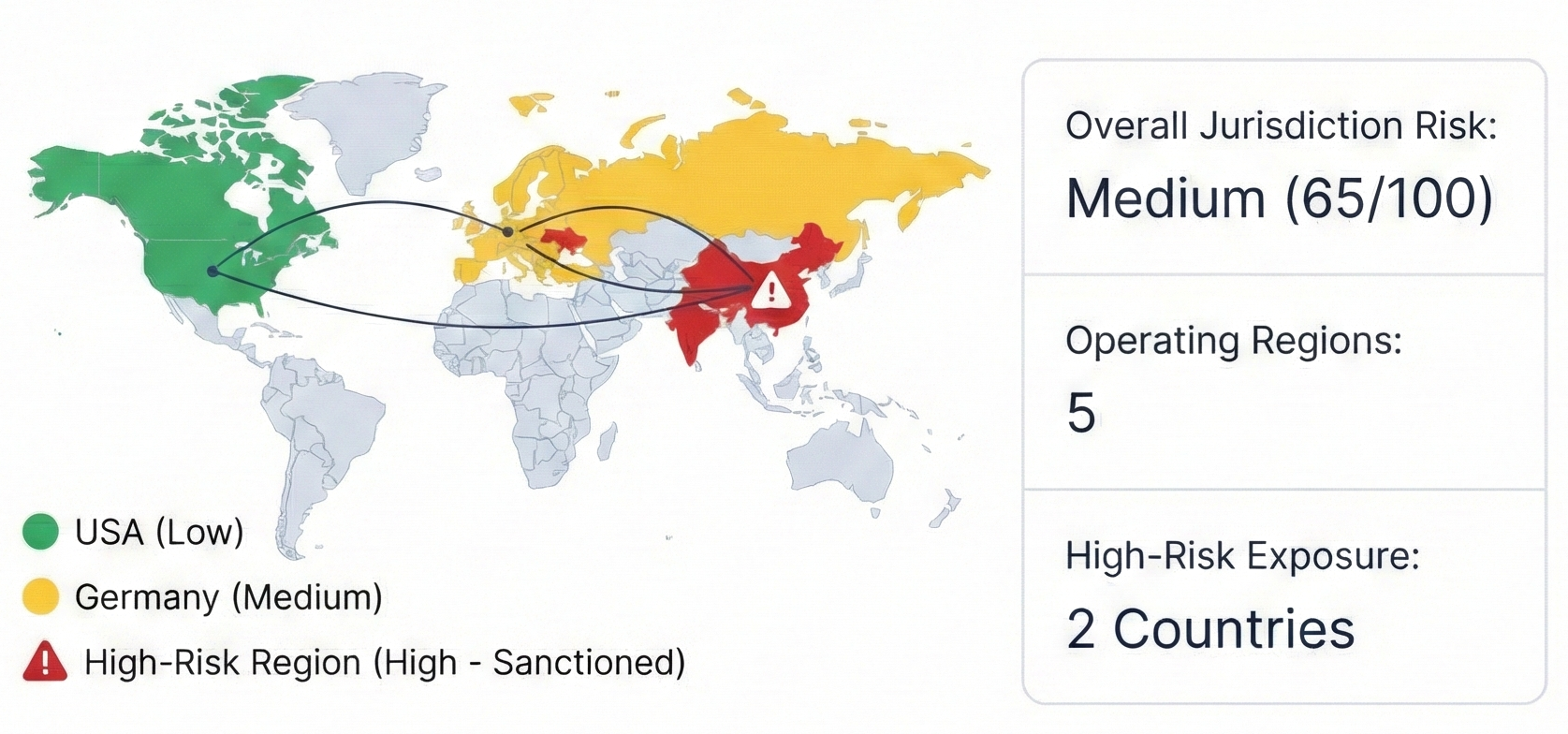
World map showing USA low risk, Germany medium risk, and two high-risk sanctioned countries in Asia.

Understand every score

See the exact drivers behind the result with factor-level breakdowns and clear rationale.

Status indicator showing a verified checkmark icon inside a badge.
Top factors
Status indicator showing a verified checkmark icon inside a badge.
Weights & thresholds
Status indicator showing a verified checkmark icon inside a badge.
Watchlist proximity context
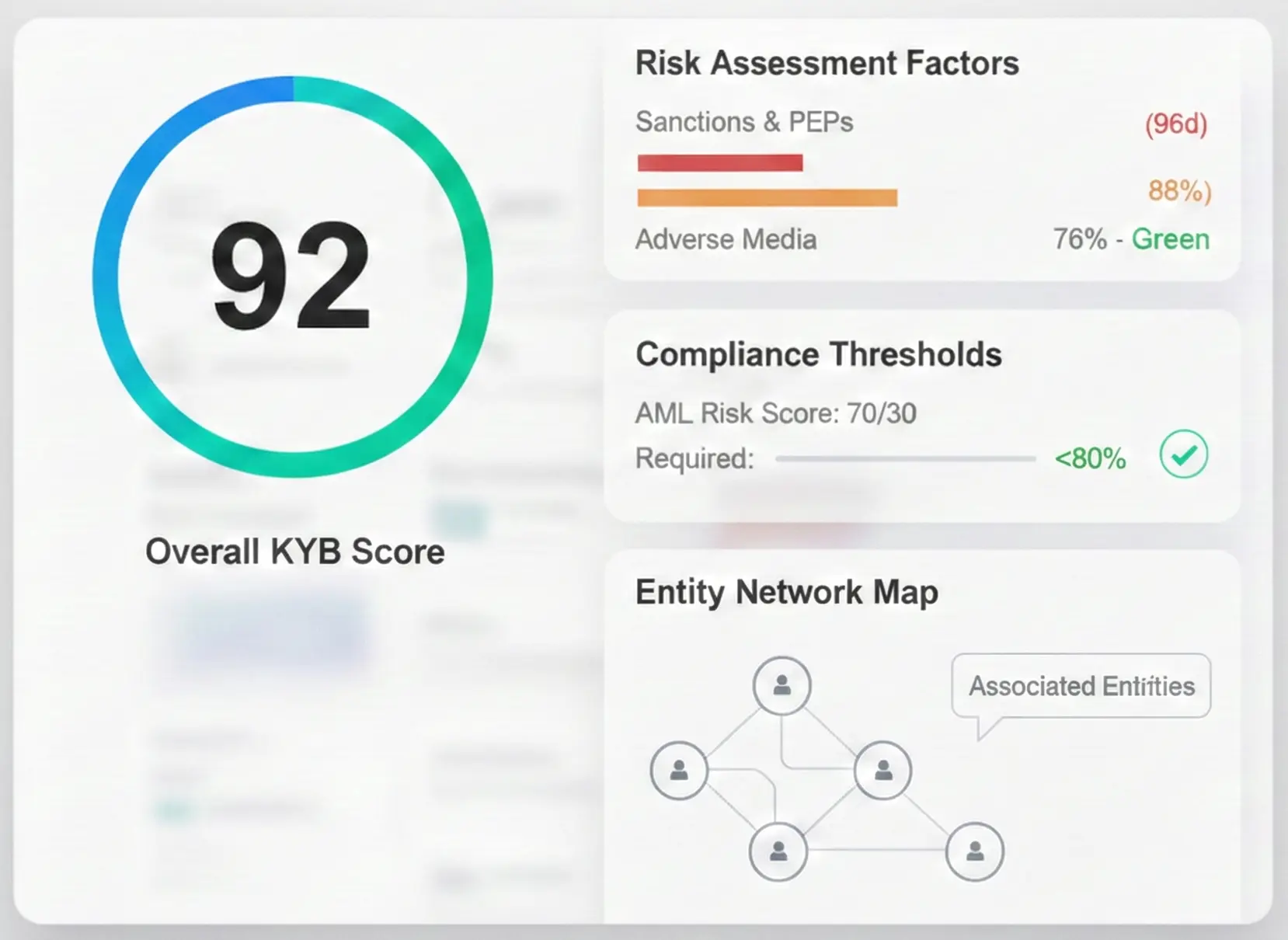
Dashboard showing overall KYB score 92, risk factors, compliance thresholds, and entity network map.
Weight icon representing risk scoring or variable weighting.

See the drivers, weights, and evidence behind every score.
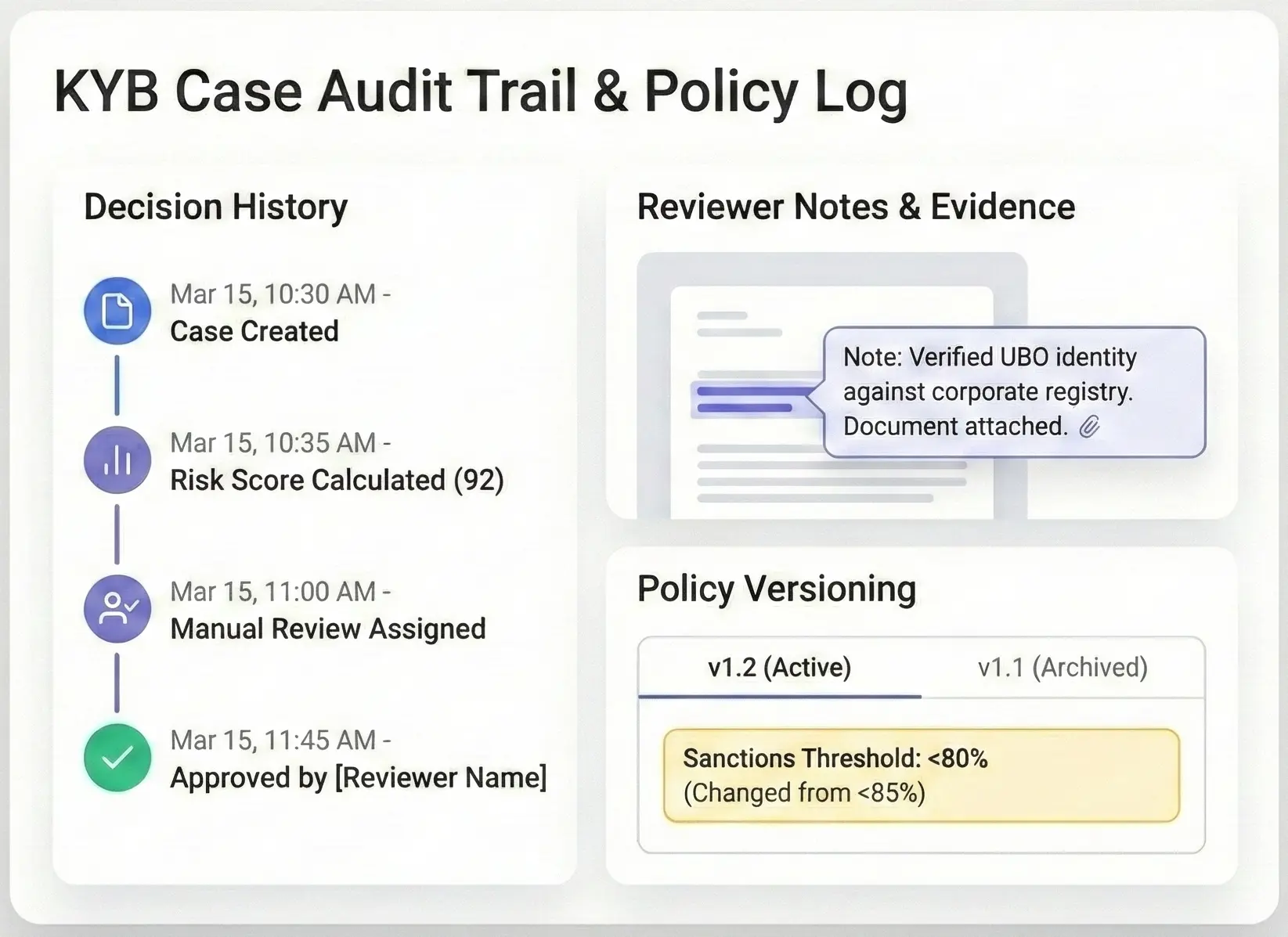
Audit trail showing decision history, reviewer notes verifying UBO, and policy version with sanctions threshold update.
Footprints icon representing a digital audit trail or user activity log.

Every decision is timestamped, attributable, and export-ready.

Built for audits and reviews

Keep evidence, decisions, and policy changes traceable across every KYB case.

Status indicator showing a verified checkmark icon inside a badge.
Decision history
Status indicator showing a verified checkmark icon inside a badge.
Reviewer notes
Status indicator showing a verified checkmark icon inside a badge.
Policy versioning
KYB case audit trail with decision history, reviewer notes verifying UBO identity, and policy versioning updates.
Footprints icon representing a digital audit trail or user activity log.

Every decision is timestamped, attributable, and export-ready.

Trigger the right workflow automatically

Route cases based on score thresholds so compliance stays in control while ops moves faster.
Status indicator showing a verified checkmark icon inside a badge.
Auto-approve low
Status indicator showing a verified checkmark icon inside a badge.
EDD for medium
Status indicator showing a verified checkmark icon inside a badge.
Escalate high
KYB workflow log with decision history, risk-based automated workflow rules, and policy version notes.
Scales of justice icon representing legal and regulatory standards.

Auto-approve low risk, trigger EDD for medium, escalate high.

Webhook node icon representing automated data transfers.
Newspaper icon representing adverse media or news reports.
Corporate building icon representing business entities.
Grouped user silhouettes representing individuals or team members.
Document icon with a checkmark representing a verified file.
Security shield with an exclamation mark representing a risk alert.
Connected nodes icon representing sharing and export capabilities.
Clipboard with a checkmark representing a completed assessment.
Stacked cylindrical icon representing data storage or registries.

Plugs into your KYB workflow

Bring your own data sources, connect your internal systems, and keep evidence attached to every risk decision.

Questions buyers actually ask

The risk scoring FAQ

Real questions from compliance teams evaluating Detelio. If something's missing, ask us in the demo — we'd rather over-share.

Can we tune weights and thresholds by segment?

Expand section details

Yes. Define segment-specific weights, thresholds, and routing rules, then version the policy so every decision is traceable to the policy that produced it.

What data sources can we use in the score?

Expand section details

Bring your own: registries, internal CRM data, watchlist screening results, adverse media, documents, and historical decisions. Connect via API and webhooks, or start with a CSV import for pilots.

How do you handle false positives and near-matches?

Expand section details

Near-matches are treated as signals, not automatic guilt. Route ambiguous cases to review, capture reviewer reason codes, and use allowlists/exceptions where appropriate so the system improves over time.

Who can change scoring logic, and how is it controlled?

Expand section details

Use role-based access: only approved admins can change weights or thresholds. Changes are logged and can be gated by review/approval depending on your process.

Can compliance override an automated decision?

Expand section details

Yes. Reviewers can override with a required reason and notes, and the final outcome is recorded with the full audit trail.

What do we need to go live?

Expand section details

A policy baseline (factors + thresholds), your preferred data sources, and one integration point (API/webhook) to send outcomes back to your workflow. Then expand coverage and automation step-by-step.

Get a free risk scoring policy review

Request a demo
Request a demo
Leave your details and we will send you access by email.
Green Checkmark
The request has been sent
Thank you for your request. A member of our team will be in touch shortly
Oops! Something went wrong while submitting the form.